Printable CVC Word Cards
Create printable word cards from a built-in set of 100 English short-vowel CVC words, with sound buttons aligned to real grapheme positions and optional blend arrows.
Customize and preview CVC word cards
Quick starts
Apply a complete configuration in one action.
Customize
Choose built-in CVC words, decoding cues, card style, and page setup.
Printable preview
Output summary
- Cards
- 8
- Card pages
- 2
- Extra pages
- 0
- Total pages
- 2
- Layout
- 4-up · sound-buttons · color
- Paper
- US Letter
Output actions
Updating preview…
Create CVC word cards in 3 steps

Choose short-vowel words
Select from the built-in catalog or a short-vowel group, or paste a list to check which words match the current 100-word catalog.

Set decoding cues and layout
Add sound buttons or a blend arrow when they support the lesson, then choose card size, paper, and ink style.

Preview and output
Check every word, cue position, and page before printing or downloading the vector PDF.
Five CVC decoding activities

Tap the three sounds
Touch each sound button and say the onset consonant, short vowel, and final consonant.

Sweep and blend
Move along the blend arrow from left to right and join the separated sounds into one word.

Sort by short vowel
Group cards by medial a, e, i, o, or u and compare the mouth movement.

Build rhyming word families
Match words that share the same medial vowel and final consonant, then notice the common rime.

Read and use the word
After decoding accurately, say the word and confirm meaning with a picture, action, or short sentence.
Choose words and cues with purpose

Stay within the strict CVC scope
The tool accepts one onset consonant, one short vowel, and one coda consonant. Digraphs, blends, silent-e, long vowels, and irregular words are rejected.

Begin with a small word set
Start with 5–10 words sharing one short vowel, then mix vowels and word families as decoding becomes secure.

Use teaching cues deliberately
Sound buttons support segmenting and the arrow supports continuous blending. Turn cues off when checking independent decoding.

Print at actual size
Match the paper setting to your printer, use 100% or Actual Size, and cut along the real guides.
PRINTABLE OUTPUT EXAMPLES
Compare two printable results
These examples use the same page layout as the current preview and downloads.
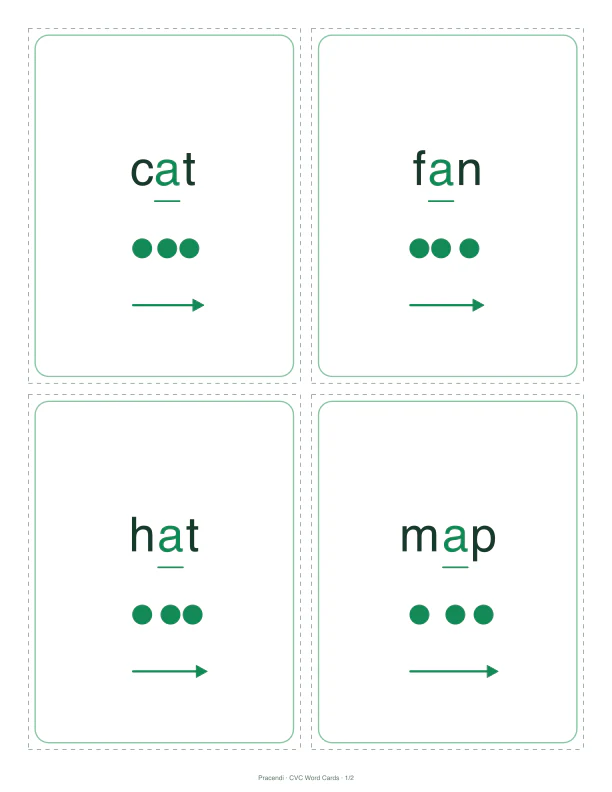
Continuous blending · Color
4-up continuous blending cards
Color short-vowel emphasis, blend arrows, and real cut guides support the move from segmented sounds to continuous reading.
- 4-up
- Blend arrows
- Cut guides
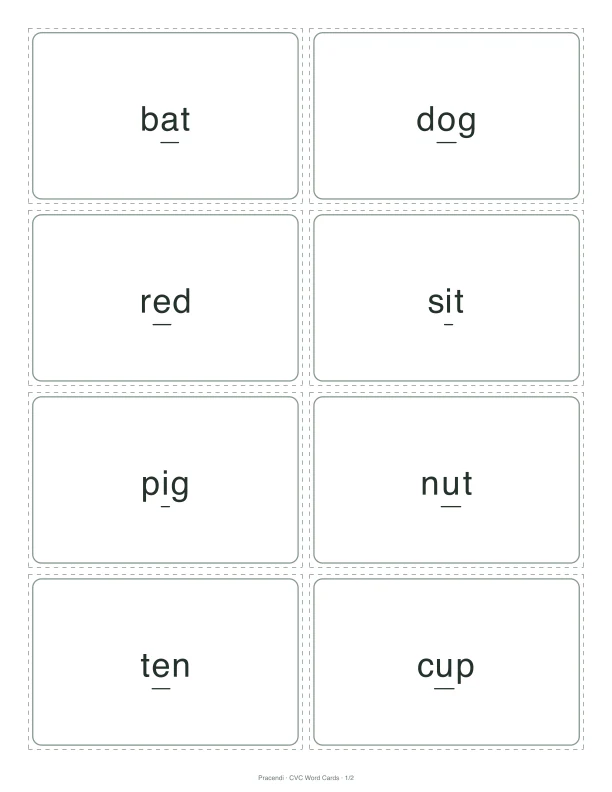
Mixed review · Low ink
8-up low-ink review cards
A compact low-ink layout removes extra cues for independent decoding and mixed review.
- 8-up
- Word only
- Low ink
Designed for short-vowel decoding practice

A defined 100-word catalog
Built-in words follow explicit CVC identity, short-vowel, and supported-character rules.
Cues align with grapheme positions
Sound buttons and blend arrows are calculated from the real text layout instead of added as loose decoration.

Consistent printable output
Live preview, SVG, browser print, and PDF use the same page layout.
Useful for these phonics settings




CVC word card FAQs
What counts as a CVC word here?
Why are some English words rejected?
Can I paste my own English word list?
Do sound buttons print on the cards?
Continue with letters, words, and reading
Pair these cards with letter-formation cards, letter tracing, and word tracing to connect print formation, decoding, and writing.
- Letter Formation CardsFree printable letter formation cards A–Z to help children learn letter shapes, stroke direction, and handwriting order. Customize, preview, and download as PDF.Open tool
- Letter Tracing Worksheet GeneratorPractice uppercase and lowercase letter formation with printable tracing sheets.Open tool
- English Word Tracing Worksheet GeneratorEnter or paste one English word per line to create tracing worksheets.Open tool
Start decoding
Build a CVC word-card set for today’s phonics goal
Choose one short vowel or a focused word set, add only the cues you need, and check every card before printing.